

0 CART
items in your cartto quote
Ooops no items were found.
Try something else.
Ok
Loading…

Microsoft Surface Dial 3D Input Device - Wireless - Bluetooth - Magnesium

Category Pointing Devices
6349584 6349584
6349584 6349584
6349584 6349584
6349584 6349584
6349584 6349584
6349584 6349584
6349584 6349584

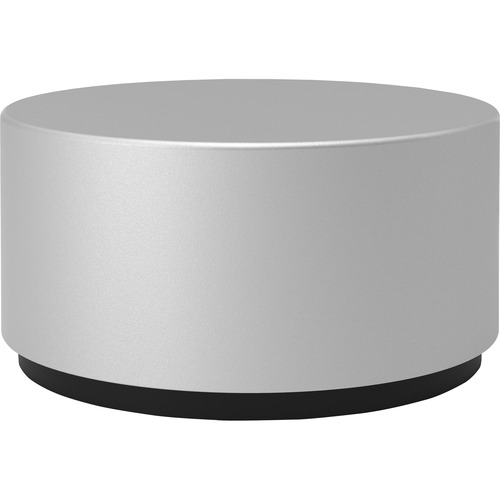
Microsoft Surface Dial 3D Input Device - Wireless - Bluetooth - Magnesium

Item Code: 6349584
Category Pointing Devices
Manufacturer Microsoft Corporation

Description

A new tool for the creative process.

Surface Dial is a completely new way to interact with technology and create in the most natural, immersive way. Store, customize, access, navigate, and reimagine physical tools in the digital world - from concept to creation.

Transition seamlessly through tasks.

Press and hold Surface Dial to display a radial menu of tools, making it easier and faster to do the things you love your way, while supporting your workflow.

Simplify actions

Make everyday tasks simple and fun. Adjust the volume on your favorite Groove track. Scroll through news articles without touching your keyboard or mouse. Fly through your local city in Windows Maps.

Partners with Pen

With Surface Dial in one hand and Surface Pen in the other, you can unlock your creativity with easy access to shortcuts, controls, drawing tools, and more.

Use directly on screen

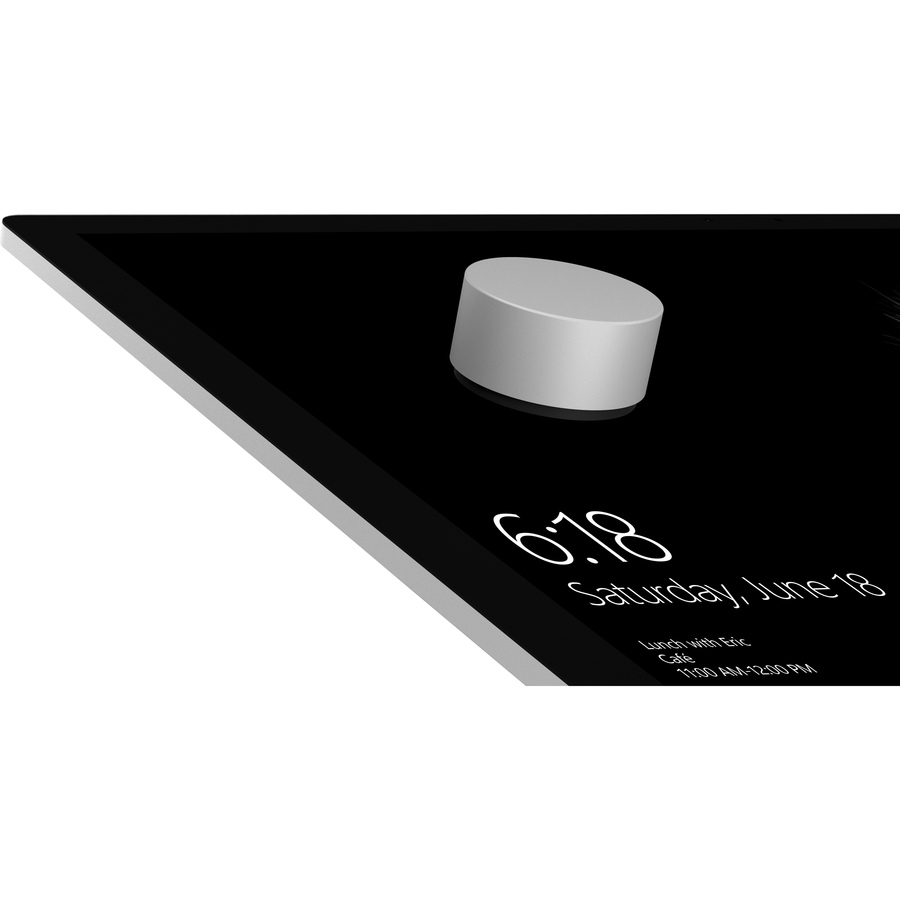
When used with Surface Studio, Surface Dial allows you to reimagine the way you design. Place it directly on the screen and watch as a color picker or ruler magically appears on your digital drafting table.

Feel your work.

Haptic feedback provides helpful vibrations through the aluminum body into your fingertips, to help you stay in the moment and feel totally in touch with your work.

Sketchable

Surface Dial gives you quick and intuitive access to the brush settings you use most. Make fast and fluid color adjustments, and rotate or scale your canvas to achieve a finer level of control.

Dial also works with these apps.

Microsoft has all the apps you need to work and play. Watch thinking in action with Ink Replay and Surface Dial in OneNote. Use with Windows Maps to tilt in 3D. Fine-tune scrub through a song in Groove Music. Access drawing tools in Plumbago.

An integral part of the Surface family.

Many of the innovative things Surface Dial can do with Surface Studio can also be done with Surface Book and Surface Pro 4.

Specifications

UNSPSC Code

43211708

Brand

Microsoft

Brand Name

Microsoft

Category

Pointing Devices

Device Supported

Tablet

Height

1.2"

Limited Warranty

1 Year

Manufacturer

Microsoft Corporation

Manufacturer Part Number

2WR-00001

Package Contents

  • Surface Dial 3D Input Device
  • 2 x AAA Alkaline Batteries

Pointing Device Connectivity Technology

Wireless

Pointing Device Wireless Technology

Bluetooth

Product Color

Magnesium

Product Line

Surface Dial

Product Name

Surface Dial 3D Input Device

Product Type

3D Input Device

Weight (approximate)

5.11 oz

Call for price
Compare

Microsoft Surface Dial 3D Input Device - Wireless - Bluetooth - Magnesium

Category Pointing Devices
6349584 6349584
6349584 6349584
6349584 6349584
6349584 6349584
6349584 6349584
6349584 6349584
6349584 6349584

Microsoft Surface Dial 3D Input Device - Wireless - Bluetooth - Magnesium

Item Code: 6349584
Category Pointing Devices
Manufacturer Microsoft Corporation

Description

A new tool for the creative process.

Surface Dial is a completely new way to interact with technology and create in the most natural, immersive way. Store, customize, access, navigate, and reimagine physical tools in the digital world - from concept to creation.

Transition seamlessly through tasks.

Press and hold Surface Dial to display a radial menu of tools, making it easier and faster to do the things you love your way, while supporting your workflow.

Simplify actions

Make everyday tasks simple and fun. Adjust the volume on your favorite Groove track. Scroll through news articles without touching your keyboard or mouse. Fly through your local city in Windows Maps.

Partners with Pen

With Surface Dial in one hand and Surface Pen in the other, you can unlock your creativity with easy access to shortcuts, controls, drawing tools, and more.

Use directly on screen

When used with Surface Studio, Surface Dial allows you to reimagine the way you design. Place it directly on the screen and watch as a color picker or ruler magically appears on your digital drafting table.

Feel your work.

Haptic feedback provides helpful vibrations through the aluminum body into your fingertips, to help you stay in the moment and feel totally in touch with your work.

Sketchable

Surface Dial gives you quick and intuitive access to the brush settings you use most. Make fast and fluid color adjustments, and rotate or scale your canvas to achieve a finer level of control.

Dial also works with these apps.

Microsoft has all the apps you need to work and play. Watch thinking in action with Ink Replay and Surface Dial in OneNote. Use with Windows Maps to tilt in 3D. Fine-tune scrub through a song in Groove Music. Access drawing tools in Plumbago.

An integral part of the Surface family.

Many of the innovative things Surface Dial can do with Surface Studio can also be done with Surface Book and Surface Pro 4.

Specifications

UNSPSC Code

43211708

Brand

Microsoft

Brand Name

Microsoft

Category

Pointing Devices

Device Supported

Tablet

Height

1.2"

Limited Warranty

1 Year

Manufacturer

Microsoft Corporation

Manufacturer Part Number

2WR-00001

Package Contents

  • Surface Dial 3D Input Device
  • 2 x AAA Alkaline Batteries

Pointing Device Connectivity Technology

Wireless

Pointing Device Wireless Technology

Bluetooth

Product Color

Magnesium

Product Line

Surface Dial

Product Name

Surface Dial 3D Input Device

Product Type

3D Input Device

Weight (approximate)

5.11 oz

Call for price
Compare
SEARCH ×

Search